Arrows
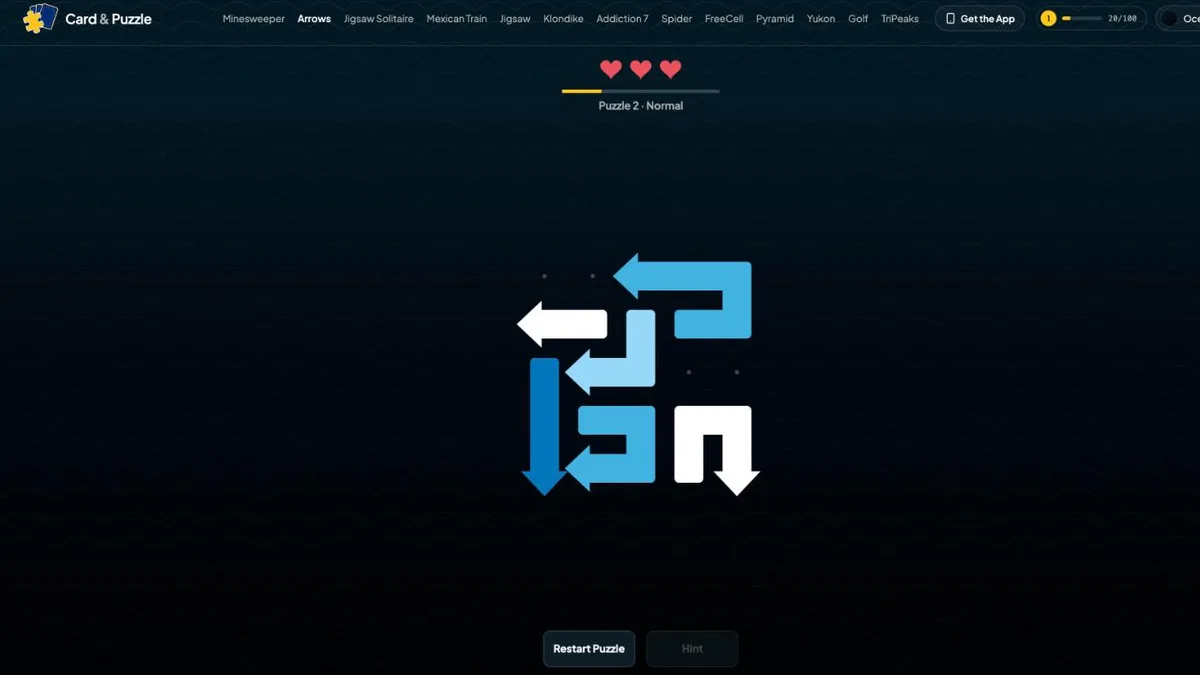
Game preview
Puzzle GamesUpdated
Arrows
Tap an Arrow, Clear Its Path, Empty the Board. Free Online
The Arrows game gives you a board crammed with arrows, all pointing different directions, all in each other's way. Tap one and it slides out of the board the way it points. Simple, except that an arrow only moves when the whole path in front of it is empty, and at the start almost nothing is. So the puzzle is not really about the arrows, it is about the order. Which one is free right now, what does taking it release, and what does that release in turn. Pull the right thread and the board unravels in a run of satisfying exits; pull the wrong one and you have spent a heart learning something. If you have met this kind of arrow escape puzzle on a phone, this is that idea built for the web: free here at CardAndPuzzle.com, playable in your browser on a PC just as well as a phone, with no download or sign-up, and it remembers exactly where you were.
How Do You Play the Arrows Game?
One tap is the entire control scheme. Everything else is deciding where to put it:
- Arrows Are Paths, Not Tiles: Every arrow is a trail of squares with an arrowhead on the last one, and most of them bend. The shortest are two squares long; the longest snake twenty-four squares across the board before they point anywhere.
- Tap to Send It Out: Tap an arrow and it drives forward in the direction of its head, the body following the head around its own bends like carriages behind an engine, until the whole thing has left the board.
- The Path Must Be Clear: The only rule that matters. Look straight out from the arrowhead to the edge of the board. If a single square on that line holds part of another arrow, this arrow cannot go anywhere yet.
- A Blocked Tap Costs a Heart: Tap a blocked arrow and it lurches forward and bounces back, the path glows red as far as the first obstruction, and the arrows in the way flash. You have three hearts per puzzle.
- Nothing Moves on Its Own: No gravity, no shuffling, no sliding into gaps. The board only changes when you remove something, which is what makes it a pure logic puzzle rather than a reaction test.
- Winning: Clear every arrow off the board. There is nothing else to collect and no bonus objective.
Want the deductions spelled out? Read the complete Arrows Guide →
Why Can Every Arrows Puzzle Be Solved?
The journey runs from Puzzle 1 onwards, played in order, one after another. There is no puzzle select and no map to navigate, just the next board waiting for you.
- Every Puzzle Is Provably Clearable: Boards are not generated at random and hoped for. Each one is built backwards from an empty board, arrow by arrow, so the sequence it was assembled in is a working solution before you ever see it. Each puzzle is verified again when it loads.
- So You Never Have to Guess: Because nothing on the board moves by itself, "A is blocking B" is a fixed fact for the whole puzzle. There is always at least one arrow that is free to go, all the way down to the last one.
- Four Difficulty Tiers: Every puzzle is labelled Normal, Hard, Super Hard or Nightmare under its number, so a spike never arrives unannounced.
- Boards Grow and Change Shape: Grids run from a 4x4 opener up to 14x20. They are not all rectangles either: boards come as ellipses, rounded slabs, diamonds, crosses and hearts, and the silhouette changes which arrows can reach an edge.
- The Difficulty Curve Levels Off: It climbs early and then settles into a rhythm rather than grinding upward forever. Hard puzzles are spaced out, a breather follows every peak, and two brutal boards never sit back to back.
- Perfect Clears: Finish a puzzle without losing a single heart and the game marks it as a perfect clear and pays bonus XP toward your level.
What Are the Difficulty Tiers in Arrows?
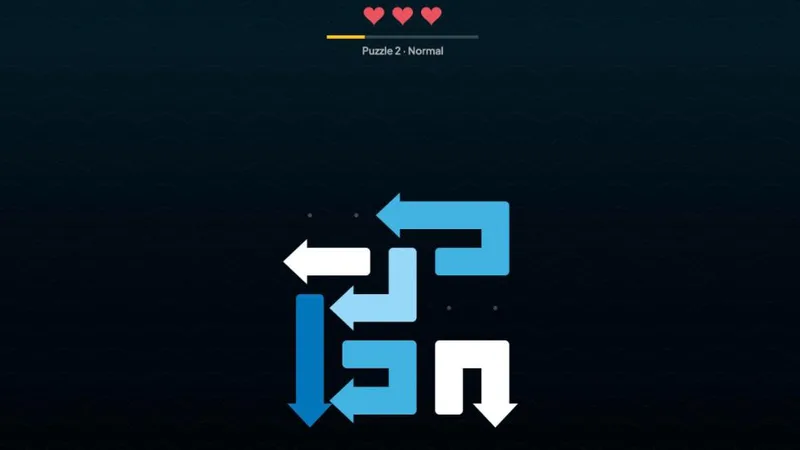
The tiers do not simply pile on more arrows. They change what kind of thinking a board asks for, and they do it by making the arrows longer rather than more numerous:
| Tier | Arrows on the board | Arrow length | What it asks of you |
|---|---|---|---|
| Normal | Many, often around fifty | Short, a few squares | Fast reading. Most of what you need is visible at a glance, and the board comes apart in long cascades. |
| Hard | Similar, still crowded | A little longer | More arrows reach across each other, so fewer are free at the start and you begin working backwards. |
| Super Hard | Fewer, around thirty | Roughly double | Careful path tracing. Long bodies block things they do not look anywhere near. |
| Nightmare | Fewest, as few as twenty | Longest, up to twenty-four squares | Nearly every arrow blocks another. Almost nothing is free at the start, and finding the opening move is the whole puzzle. |
That inversion is the thing worth knowing about Arrows: a nearly empty-looking board is usually the dangerous one, and a board packed edge to edge with arrows is usually the relaxing one.
How Do the Arrows Controls and Hearts Work?
- One Tap, Everywhere: Tap or click an arrow to send it. No dragging, no rotating, no holding. Mouse and touch play identically.
- Built for Crowded Boards: The game picks the arrow by the board square you touched rather than by the thin arrow graphic, and forgives a near miss up to three quarters of a square. Squares are always sized to stay a comfortable target on a phone.
- See Before You Commit: Press down and the arrow under your finger lifts slightly, so you can confirm you have the one you meant before you let go.
- Blocked Taps Teach You: A refused tap lights the path in red up to the first obstruction and flashes what is in the way. The rule gets shown rather than explained.
- Three Hearts, Then Restart: A blocked tap costs a heart. Lose all three and the puzzle restarts with three fresh ones, from the same layout. Restart is always available if you want a clean run at a board.
- Nothing to Undo: A blocked tap does not change the board, and a successful tap is always correct, so there is no move to take back.
- Colours That Separate: Arrows are tinted from the active theme, arranged so that no two touching arrows ever share a colour. On a board of seventy overlapping shapes, that is what keeps one arrow visually distinct from the next.
- Picks Up Where You Left Off: The board saves after every tap, so a half-finished puzzle is still half-finished when you come back.
What Are the Best Arrows Strategies?
- Look Down the Barrel, Not at the Arrow: The body of an arrow does not matter for its own move. Only the straight line out from its head does. Beginners study the shape; the line is what decides.
- Start at the Edges: An arrowhead already pointing at a nearby edge has the shortest path and the fewest chances of being blocked. Edge-facing arrows are the usual way in.
- Take Unblockers First: When several arrows are free, prefer the one whose removal frees the most others. Clearing a long body that lies across half the board opens far more than clipping a two-square arrow off a corner.
- Long Arrows Are Obstacles Twice: A long arrow needs a long clear path to leave, and its body blocks a lot while it waits. On Super Hard and Nightmare boards, find out early what it will take to remove them.
- Do Not Pay to Check: Tapping to find out whether something is blocked is the main way people lose hearts. Trace the path with your eye first; it is free, and the answer is always visible.
- When Stuck, Work Backwards: Ask which arrow you want gone, then find what blocks it, then find what blocks that. The chain almost always ends at an arrow that is already free.
- Restart Without Regret: Nothing is lost by restarting a board. On a Nightmare puzzle, a fresh run with what you learned the first time is usually faster than grinding on with one heart.
Can You Play the Arrows Game on PC?
Yes. This is a browser version, so it runs on a PC, a Mac, a Chromebook, a laptop, a tablet or a phone with nothing to install. That is the practical difference between here and the app stores: the popular arrow escape puzzles are phone-only apps, so if you have been playing one on the train and wanted the same puzzle on a bigger screen at your desk, a browser is the way to get it.
- No App and No Account: Open the page and the board is already there. Nothing to download, nothing to sign up for, and your progress saves on the device you are playing on.
- A Click Is a Tap: Arrows only ever asks for one input, so nothing is lost or added by playing with a mouse. Desktop and touch are the same game.
- Room for the Big Boards: Later grids run up to 14x20. On a monitor you can take in a whole Nightmare board at once and follow a long arrow's path without pinching to zoom.
- No Energy Meter: Plenty of arrow puzzle apps stop you with a lives counter and sell you refills. There is none of that here. Run out of hearts on a puzzle and you simply start that puzzle again.
Why Play Arrows Here?
- No Unfair Boards: Not endless random grids. Every puzzle is built so that a full solution exists before you ever see it, and checked again when it loads, so none of them can strand you.
- No Timer, No Score, No Energy: Nothing counts down and nothing locks you out. There is no lives meter to wait on and no stamina to spend. Play one puzzle or forty.
- Free in Your Browser: No download, no app store, no account. It works the moment the page loads, on any device.
- Made for Fingers: Cell-based tapping with generous targets, so a dense board does not turn into a game of precision poking.
- Matches Your Theme: The board, the arrows and the whole interface redraw in whichever of our themes you are using. Pick one on the themes page.
- Good for Your Brain: Arrows is planning practice: reading dependencies, sequencing moves and thinking a few steps ahead, the same sort of workout that makes logic games good for your brain.
From a Locked Board to an Empty One
A fresh Arrows board looks like a knot. Arrows point every which way, most of them jammed behind something else, and there is no obvious place to begin. Then you spot one aimed at open space near an edge, and it goes. That clears a lane, which frees the long arrow that was waiting on it, and that one's departure opens up half a row. Three moves later the board is coming apart in your hands, and the last arrow slides out of a grid that is otherwise completely empty. That unlocking cascade is the whole appeal of the Arrows game, and there is always another board waiting.
More Free Games
If you like puzzles where the board is guaranteed to be solvable, Minesweeper makes the same promise in its Journey mode, and FreeCell Solitaire is the card game built on it. For something calmer with no way to fail at all, try Jigsaw Solitaire.
Frequently Asked Questions
What is the Arrows game?
Arrows is a logic puzzle played on a board packed with bent arrows. Each arrow is a path of squares with an arrowhead on the end, and tapping it slides the whole arrow forward off the edge of the board, body trailing behind the head like a train. An arrow can only leave if every square ahead of its head is empty, so the puzzle is working out the order to remove them in. Clear every arrow and the board is solved.
How do you play Arrows?
Tap any arrow. If the straight line from its head to the edge of the board is completely clear, the arrow slides out and is gone. If another arrow is sitting anywhere on that line, nothing moves, the blocked path lights up in red, and you lose one of your three hearts. Nothing else on the board ever shifts, so every arrow you remove permanently opens paths for the ones behind it. Work out which arrows are free right now, take them in the right order, and the board empties.
Can an Arrows puzzle be impossible to solve?
No. Every puzzle is built backwards from an empty board, so the order it was created in is itself a guaranteed solution, and each puzzle is checked again when it loads. There is never a puzzle that traps you, and never a point where you have to guess. If you are stuck, an arrow you can take exists somewhere on the board.
How big do Arrows boards get?
They start small, at 4x4 with six arrows, and grow to 14x20 grids holding as many as seventy-five. The boards are not all rectangles either: they come as ellipses, rounded slabs, diamonds, crosses and hearts, and the silhouette changes which arrows can reach an edge. Every puzzle is labelled Normal, Hard, Super Hard or Nightmare before you start, so you always know what you are walking into.
What happens when I run out of hearts?
Each puzzle gives you three hearts, and a blocked tap costs one. If all three are gone you restart that puzzle with a fresh three. Nothing else is lost: your place in the journey stays exactly where it is, and the board resets to how it started rather than sending you backwards.
Is there a timer in Arrows?
No. There is no timer, no score and no move counter. You can stare at a board for ten minutes without anything ticking against you. The only thing that measures you is your hearts, and those only respond to mistakes, not to slowness.
What makes the Nightmare puzzles hard?
Not the number of arrows. Nightmare boards actually hold fewer arrows than a typical Normal board, often around twenty on a large grid. What makes them hard is that the arrows are long, up to twenty-four squares, and they reach right across the board, so almost every arrow blocks something and the order you have to take them in is far less obvious.
What kind of puzzle game is Arrows?
It is an arrow escape puzzle, a family sometimes labelled arrow out or arrow blocking puzzles, and one that has become popular on mobile. The shape of it is always the same: a board packed with arrows, each able to leave only when the lane in front of it is clear, so the real puzzle is working out the order to remove them in. This is that genre built to play free in a browser, with no energy meter and boards that are guaranteed to be solvable.
Is the Arrows game free to play?
Yes. Arrows on CardAndPuzzle.com is completely free and runs in your browser. There is nothing to download, no account to create, and your progress through the puzzles is saved automatically on your device, including a board you are in the middle of.
Can I play Arrows on a PC or laptop?
Yes. Arrows runs in the browser, so it works on a PC, a Mac, a Chromebook, a laptop and a tablet as well as a phone, with nothing to download. Most arrow escape puzzles are phone-only apps, so a browser version is usually the only way to play this kind of puzzle at a desk. A mouse click does exactly what a tap does, and the bigger screen genuinely helps on the large late boards.
Can I play Arrows on my phone?
Yes. It works on phones, tablets, laptops and desktops. The game only ever asks for a single tap, and it picks the arrow by the square you touched rather than by the thin line of the arrow itself, so crowded boards stay easy to hit accurately on a small screen.
Further Reading
- Is Solitaire Good for Your Brain?
Solitaire is genuinely good for your brain — but not for the reasons most articles claim. Here's what the research actually says about cognitive benefits.