Minesweeper
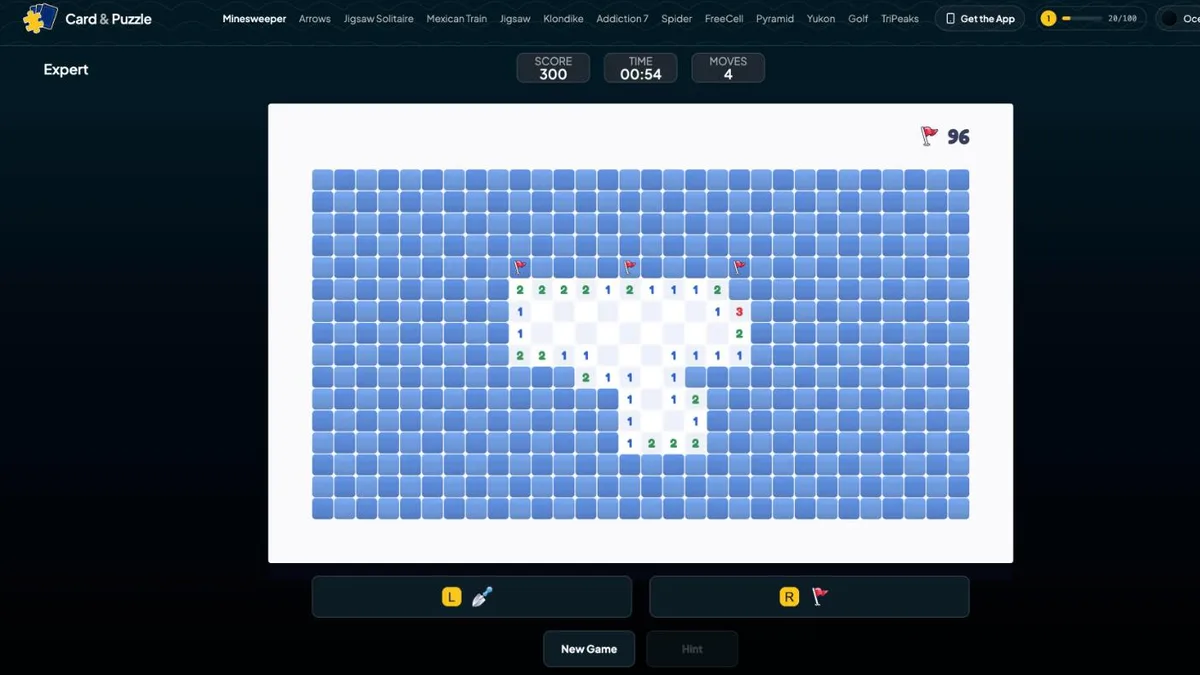
Game preview
Puzzle GamesUpdated
Minesweeper
Read the Numbers, Flag the Mines, Clear the Field. Free Online
Minesweeper is the little logic puzzle that shipped with Windows and quietly taught a whole generation how to think in probabilities. A grid of covered squares, a handful of mines hiding underneath, and numbers that count the mines around them. That is the entire game, and thirty-odd years later it still has a grip on me.
What I never loved was the guessing: you play a perfect board for ten minutes, and then a 50/50 in the corner blows it up. So this version of free Minesweeper has two modes. Journey mode is no-guess Minesweeper, where every board is checked by a solver so pure logic always gets you home, and mistakes cost a heart instead of the whole board. Classic mode is the traditional game with the traditional sizes, a timer, and one mine ending the run, for the days you want it exactly as you remember. It is free here at CardAndPuzzle.com, plays in your browser with no download or sign-up, and saves your progress on your device.
How Do You Play Minesweeper?
The minesweeper rules fit on a napkin, and the whole game lives in how you read the numbers:
- Dig a Square: Uncovering a square reveals a number, or a blank. The number counts the mines in the squares touching it, corners included, so every number is looking at up to eight neighbors.
- Blanks Open Themselves: A revealed zero has no mines around it, so the game opens all of its neighbors for you, and any zeros among those keep the chain going. Big openings come from this.
- Flag the Mines: When the numbers prove a square hides a mine, plant a flag on it. Flags are notes, not commitments. They are never penalized and you can remove them at any time. The mine counter at the top shows how many mines are still unflagged.
- Chord to Go Faster: Click a revealed number whose flags already match it and the game digs the rest of its neighbors in one move. It is the skill move of Minesweeper and the one that makes clearing a board feel fast.
- Winning: Uncover every safe square. You never have to dig the mines, and you do not even have to flag them all. Once the last safe square is open, the field is clear.
New to Minesweeper or tired of guessing? Read the complete Minesweeper Guide →
What Is the Difference Between Journey and Classic Minesweeper?
Both modes are Minesweeper, with the same numbers and the same logic. What changes is how much the game is willing to let you get hurt.
- Journey Is No-Guess Minesweeper: Journey is a ladder of numbered puzzles played one after another, in order. Every board is generated, then handed to a logical solver, and only kept if the solver can clear the whole thing from the starting area without a single guess. If you are stuck in Journey, there is always a deduction you have not spotted yet.
- A Safe Start: Each Journey puzzle opens with a small area already dug for you, so you begin with real information instead of a blind first click.
- Three Hearts, No Explosions: Digging a mine in Journey costs one heart. The mine is defused in place, stays visible, and behaves like a flag for the numbers around it, and you play on. Lose all three and the puzzle restarts with three fresh hearts and the same layout.
- Boards That Grow: The first puzzles are a teaching ramp from gentle 5x5 boards up to 10x10. Later puzzles climb to 12x12 in waves, with breather puzzles between the climbs and mine density creeping up within each wave. Puzzle 40 is the same layout for every player, so you can compare notes with a friend.
- Classic Is the Real Thing: The same three board sizes Minesweeper has always used, listed in full below. The first click is always safe and opens the squares around it. After that, one mine ends the game.
- Race the Clock: Classic has a count-up timer and remembers your best time for each difficulty. Clear a board faster than before and the win screen tells you so.
- Classic May Ask You to Guess: Traditional boards are placed at random and are not checked for solvability, so like the original, a Classic board can end in a coin flip. That is part of the classic experience, and it is exactly what Journey was built to remove.
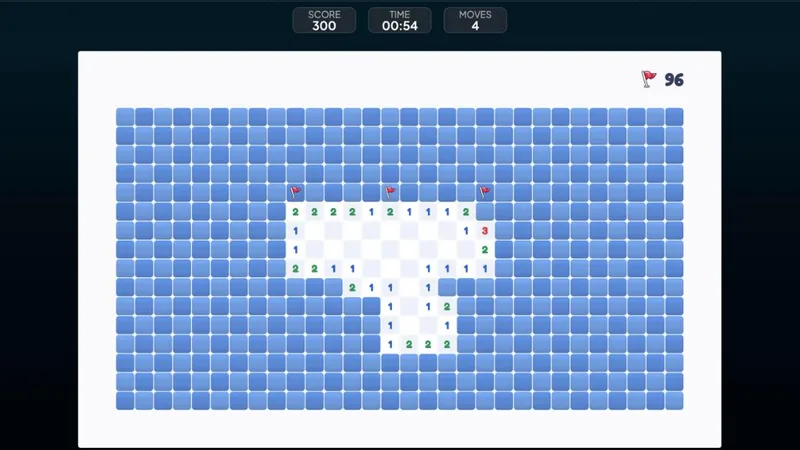
What Are the Minesweeper Difficulty Levels?
Classic uses the three board sizes Minesweeper has always used. What changes between them is not just the size but the mine density, which is why Expert feels so much sharper than Beginner rather than just longer:
| Difficulty | Grid | Mines | Density | What it asks of you |
|---|---|---|---|---|
| Beginner | 9 x 9 | 10 | 12% | Satisfied numbers alone will usually clear it. The place to learn the patterns. |
| Intermediate | 16 x 16 | 40 | 16% | Openings are smaller, so you need the wall patterns and a habit of chording. |
| Expert | 30 x 16 | 99 | 21% | Dense enough that the last few squares can come down to the mine count, or a coin flip. |
Journey does not use these sizes. Its boards start at a gentle 5x5 and grow toward 12x12 as you go, with the mine density creeping up inside each wave of puzzles and a breather board after every climb.
How Do the Minesweeper Controls Work?
- Mouse: Left-click digs, right-click flags, and left-clicking a satisfied number chords. The browser's right-click menu is switched off over the board, so it behaves just like the desktop app. Click a number whose flags do not match yet and the game highlights the covered squares it governs, a quick way to see what a number is talking about.
- Touch: A dig / flag toggle sits under the board. Tap with the shovel to dig, switch to the flag to mark, or press and hold any covered square to plant a flag without switching tools. Tapping a satisfied number chords, the same as on desktop.
- Restart Anytime: A fresh run at the same board is always one tap away and costs nothing. On a Journey puzzle the layout is fixed, so a restart is a second attempt at a board you now understand better.
- Misclick Protection: Digging a flagged square does nothing except wiggle the flag. A flag guards the square, which is exactly why you planted it.
What Are the Best Minesweeper Strategies?
- Start With Satisfied Numbers: A 1 with exactly one covered neighbor is a mine. A 1 that already touches a flag means every other covered square around it is safe. Those two facts alone clear most of a Beginner board.
- Learn the 1-2-1: Along a straight edge, a 1-2-1 pattern means the mines sit under the two 1s and the square under the 2 is safe. The 1-1 at the end of a wall is its cousin: the square past the second 1 is safe. Learn to see these at a glance and the game speeds up dramatically.
- Count Overlaps: When two numbers share covered squares, subtract. If a 2 and a 1 share the same pair of unknowns and the 1 sees nothing else, the 2's extra mine has to be in a square the 1 cannot see.
- Chord Only When Sure: Chording with a wrong flag digs a mine. In Journey that is one heart; in Classic it is the game. Double-check the flag before you chord off a number.
- Trust the Journey Boards: In Journey there is always a safe move available somewhere. If you feel forced to guess, you are not; walk the frontier of numbers again and check every pair of numbers that share covered squares.
- Classic Endgames Are About Mine Count: When the numbers run out on a Classic board, the mine counter is your last piece of evidence. If two mines remain and three regions are unresolved, one region is clean.
- Flag Less on Expert: Fast Expert players skip flags on obvious mines and just dig around them. It saves clicks, but keep flagging anywhere you plan to chord.
Why Play Minesweeper Here?
- No-Guess Journey Boards: Puzzle after puzzle in a numbered run where a solver has already proved that logic alone will clear the field. Frustration removed, thinking kept.
- A Proper Classic Mode: The traditional sizes, a safe first click, a mine counter, a timer, and per-difficulty best times, for players who want the game they grew up with.
- Free in Your Browser: No download, no app store, no account. It works the moment the page loads, on any device.
- Built for Touch and Mouse: Press-and-hold flagging and a dig / flag toggle on phones, right-click flagging and chord previews on desktop.
- Good for Your Brain: Minesweeper is pure deduction: counting, constraint tracking, and working memory, the same kind of workout that makes logic games good for your brain.
- Picks Up Where You Left Off: Journey progress, Classic best times, and the puzzle you were in the middle of all save automatically on your device.
From a Blind Grid to a Clear Field
Every board starts as a wall of identical covered squares. Then one opening spills across a corner, numbers appear along its edge, and the grid starts talking to you. A 1 gives away a mine, that mine satisfies a 2, the 2 frees three squares, and the frontier rolls forward one deduction at a time until the last safe square opens and the field is clear. That steady click of certainty is what has kept Minesweeper on desktops for decades. Start with Journey if you want the logic without the luck, or open a Classic board and chase a best time.
More Free Games
If you like puzzles where every board is guaranteed solvable, Arrows is the other pure-logic puzzle here, where every board is provably clearable, and FreeCell Solitaire is the card game with the same promise. Jigsaw Solitaire offers calmer picture-matching with no fail state at all, and for a classic to unwind with after an Expert board, there is always Klondike Solitaire.
Frequently Asked Questions
What is Minesweeper?
Minesweeper is a logic puzzle played on a grid of covered squares with mines hidden under some of them. Every square you dig up shows a number that counts the mines in the squares touching it, corners included. You use those numbers to work out which squares are safe to dig and which ones hide a mine, and you win by uncovering every safe square on the board.
How do you play Minesweeper?
Dig a square to reveal it. If it shows a number, that number tells you how many mines sit in the up-to-eight squares around it. A revealed zero opens all of its neighbors automatically. When the numbers prove a square holds a mine, plant a flag on it; when they prove a square is safe, dig it. Keep going until every safe square is open. The mines never need to be dug, only left alone or flagged.
What is the difference between Journey and Classic mode?
Journey is a ladder of numbered puzzles played strictly in order. Every Journey board is checked by a solver so it can be finished by pure logic with no guessing, it starts with a safe area already opened, and you have three hearts. Classic is traditional Minesweeper: pick Beginner (9x9, 10 mines), Intermediate (16x16, 40 mines) or Expert (30x16, 99 mines), the first click is always safe, one mine ends the game, and a timer tracks your best time for each difficulty.
What happens when I dig a mine in Journey mode?
Nothing explodes. Digging a mine costs one of your three hearts and the mine is defused where it sits, so it stays visible and counts toward the numbers around it like a flag would. You keep playing. If you lose all three hearts, the puzzle restarts with three fresh ones and the same layout, so you keep your place in the Journey.
What is chording in Minesweeper?
Chording is clicking a revealed number that already has the right number of flags (or defused mines) around it. The game then digs every other covered square next to that number in one go. It is the fastest way to open a board once your flags are in place. If one of those flags is wrong, the chord stops at the first mine it hits, so in Journey a bad chord costs one heart, never several.
How do I flag a mine on my phone?
On a touch screen there is a dig / flag toggle under the board. Switch it to the flag and tap a square to mark it, or keep the dig tool selected and press and hold a covered square to plant a flag without switching. Flags are free notes you can add or remove at any time. On a desktop with a mouse, left-click digs and right-click flags, the same way it has always worked.
Is Minesweeper free to play?
Yes. Minesweeper on CardAndPuzzle.com is completely free and runs in your browser. There is nothing to download, no account to create, and your Journey progress and Classic best times are saved automatically on your device.
Can I play Minesweeper on my phone?
Yes. The game works on phones, tablets, laptops and desktops. On touch screens you get a dig / flag toggle and press-and-hold flagging, and Journey boards are sized so the squares stay easy to tap. Expert Classic boards are wide, so they are most comfortable on a tablet, a laptop, or a phone turned sideways.
How is this different from Windows Minesweeper?
Classic mode plays like the Windows original: the same three difficulty sizes and mine counts, a safe first click, a mine counter, a timer, and one mine ending the game. Journey mode is the new part. Its boards are generated so that logic alone always clears them, which the Windows game never guaranteed, and it swaps instant game-over for three hearts and defused mines so a slip costs a heart instead of the whole board.
Further Reading
- Why Did Microsoft Include Solitaire in Windows?
Microsoft included Solitaire in Windows to teach mouse skills — not for fun. The full story of Wes Cherry, Windows 3.0, and the game that trained a generation.
- Is Solitaire Good for Your Brain?
Solitaire is genuinely good for your brain — but not for the reasons most articles claim. Here's what the research actually says about cognitive benefits.